Real Deal About Chinese X79/99 Motherboards (Machinist, Huananzhi...)
Wondering if Machinist or Huananzhi X79/X99 motherboards with Xeon CPUs are still worth buying in 2025? We review gaming and daily performance, pricing, and reliability.
If you have dig into PC-building rabbit hole on YouTube or AliExpress, you might have seen the Cheap Motherboard brands like Huananzhi, Machinist etc... Also not only the motherboard, theese are selling with Xeon CPU and Ram bungle, even the cooler comes with it for really cheap price... Chinese brands producing low-cost X79 and X99 motherboards are often paired with Xeon CPUs. But are theese extreme cheap prices are good for the quality or really a scam? Can they give real performance and stability like a quality pc for gaming, productivity and daily tasks?

This blog dives deep into the world of Chinese X79/X99 and other chipset motherboards, examining actually what they are? What are the risks of buying this combo's?
📜 What Are These Motherboards, Really?
First of all, theese motherboards doesnt have genuine Intel X79/X99 chipsets and theese motherboards do not have the quality VRM's and other required chips to power up and control the CPU, that we compare to quality motherboards like Asus, MSI...
Most Chinese motherboards labeled as X79/X99 are actually re-engineered or reverse-engineered to build the motherboard with used junk chips that are working, to produce a very cheap motherboard.
Instead of real X79/X99, theese chips are the alternative chips that has posibility to power up the superior CPU. These Chinese brands often use C612 (the closest design as X99) or other B85/Z87/H81 Haswell era chips that can power up an LGA2011/LGA2011-3 CPU's after redesign/reverse engineering. If description at the listing says "Supports Quad Channel," its probably C612. If it says "Dual Channel," we can understand that it is a B85. C612 is the true server chip from the similar era... Some sellers do write the actual chip they use but it is no guarantee, some of them ship randomly...
You’ll often find theese motherboards bundled on AliExpress or eBay with:
- Cheap combo's come with Xeon CPU's like E5-2678 v3 and other low Clock Frequency but multi core Xeon's... Expensive ones may come with top tier used Cpu's like I7 5820K but require better cooler up to 240mm AIO
- Mostly dual kit 16 to 32 GB of ECC or non-ECC DDR3/DDR4 Rams
- Some bundles do include Cooler supported for that mobo/cpu
Ram maybe new but cpu would be %99 used... As we know we may cannot find Brand New cpu with that years old... But Brand New OEM DDR3/DDR4 rams are cheap today, that makes it possible to come fresh with bundle...
Prices for full combos often fall under $120–$150, making them look pricely ideal for an extreme budget builds...
🔧 Key Brands: Machinist, Jingsha, Huananzhi
Here’s the examples of most known Chinese X79/X99 Motherboard brands:
| Brand | Known For | Quality Range | Notes |
|---|---|---|---|
| Machinist | Low cost entry-level X79/X99 boards | 🔹🔹 | Popular, but some models do have bad BIOS and VRMs. |
| Jingsha | Mid tier boards, some come with heatsinks | 🔹🔹🔹 | Has better layouts and better BIOS update/support. |
| Huananzhi | Near premium in Chinese motherboard brand | 🔹🔹🔹🔹 | Better VRMs, BIOS support, and aesthetics. Often more expensive, but still budget-friendly compared to mainstream brands. |
✅ Pros of Chinese X79/X99 Boards in 2025
- Unmatched Price-to-Performance
- Xeon E5 and Intel Core I7 5xxx Series chips like the 2678 v3 (12-core/24-thread) are dirt cheap and has very good performance in workstation/server tasks, has a dependable difference in parallel processes and deep learning
- Great for Learning or Fun Builds
- You can get theese combo's to learn building a pc, which may be low risk because of low price... And you can use theese systems for building a home server, linux server system, NAS etc... Also you can learn overclocking by overvolting core voltage, in order to risk a system that costs minimal budget...
- ECC RAM Support
- ECC (Error Correction Code) support with eligible ram may do good job in secure server processes
- Wide Availability
- AliExpress, Banggood, and even Amazon (via third-party sellers) offer very good deals with CPU, RAM And even cooler combo. Also other countries local sellers import theese motherboards bulkly and sell them as "OEM Product" instead of brands but you can search/contact them for details about models
- Multi-Cpu Support
- Some of theese Chinese motherboards has versions with Dual/Quad CPU Socket which makes them a better multitasking solution without busting the bank

🔍 Beyond X79/X99: Exploring Chinese AM4, B85, H81 and More
As we know theese Chinese motherboards do get most of the attention with High Core X79/X99 systems, but they also have more product bundles with other CPU platforms with still unbeatable prices... Let's see other chipsetted products that some of them are still can be counted as "Modern" in 2026...

🔸 AM4 Motherboards (Ryzen-Based)
For modern chipset builds, Chinese manufacturers like Machinist, Kllisre, and Atermiter are also producing AM4 motherboards compatible with Ryzen 1000–3000 series CPUs, also it comes with unofficial support for Ryzen 5000 series which is a todays beast for gaming. Since AM4 platforms are officially produced between 2016 to 2022, we can call this a "Modern System". Dont forget that AMD is still producing AM4 Processors...

✅ Pros:
- More modern platform that isnt old as X79/X99... AM4 builds are still budget and usable today...
- Cheap combos with old but still usable AMD Ryzen Cpu's (Used R5 2600, R7 2700...)
- Carries almost some modern similar specs as AM4 Builds... Often include M.2 NVMe support, USB 3.0, HDMI
- AM4 systems are more eligible for Modern GPU's support, so you can pair your system with more support to modern GPU's like RTX 4000 series...
⚠️ Cons:
- Theese boards use daily A320 chipset clone. Sadly theese come with locked BIOS. That means no overclocking support
- VRMs are typically weak, high clock power (TDP) processors do have risk of burning motherboard's VRM's.
- BIOS updates are less supported and unofficial
Example Use Case:
Ryzen 5 2600 + 16GB DDR4 + AM4 board combo for ~$130, is extremely budget for an almost modern system for now. With an eligible budget GPU, it will run games like Fortnite, Apex Legends, or GTA V.
🔹 Intel B85 / H81 Motherboards (LGA 1150)
These motherboards are designed for Intel 4th Gen "Haswell" CPUs, like Core i5-4570 or Xeon E3-1230 v3. They are popular for ultra budget daily systems or old gaming builds...
✅ Pros:
- Dirt cheap combo deals (Mobo + Cpu + DDR3 Ram) will cost less than 80USD!!!
- Nice build for games from 2013-2017. Also theese chipset and cpu combos are good for hackintosh...
- DDR3 Ram, which is cheaper than DDR4. Used ones are like candy prices...
⚠️ Cons:
- No NVMe support as Haswell didnt supported it Intel's Officially (some of modded ones do support but logically it shouldnt)
- Old platform: No USB 3.1 support, PCIe 3.0 is limited
- Insecure and Incapable boot chain (no Legacy/Secure Boot support)
Bonus Tip:
B85 + Xeon E3-1231 v3 is still surprisingly capable for daily pc tasks, office work, and even light gaming in 2025.
🔹 H61 / H55 Boards (LGA 1155 / 1156)
Theese brands still have older tech Sandy Bridge/Ivy Bridge cpu's like the i5-2400 or i7-3770. Some are produced in small ITX formats for NAS or Small Home Server/Storage builds...
 |
| Esonic, one of the Similar Chinese brand |
Why people still use them:
- Extremely low costs and almost no risk because of cost. If it fails you may loose 50-80USD which is a low budget
- Ideal for basic Linux servers with low load, routers, small network project builds for learning, or Windows 7 era retro gaming
Limitations:
- This system is the one of the most outdated products... Ram is DDR3 and supports old Graphic cards and low pci-e support for SSD's.
- Good for old OS's. Doesnt officially suport Windows 11
- SATA II support which is an old and slow SATA Interface
🔸 B450 and A320 “Clones”
Theese motherboards are still made from reverse engineering and mods...Some manufacturers label their boards as B450, but actually use A320 chipsets with a custom BIOS hack to allow Ryzen 3000 or 5000 support.
Good news:
- These sometimes do work with Ryzen 5 5600G or 4650G (Chinese APUs popular in DIY market)
- Many include modern supports like HDMI, USB 3.0 and NVMe
Bad news:
- BIOS bugs are making too much problem
- VRM cooling is still a problem
- Overclocking is blocked by BIOS

⚠️ Cons and Risks of Chinese Motherboards
- Unknown Quality Control
- Theese boards cannot compared with nice brands according to quality issues... With respect to brands like ASUS, MSI, or Gigabyte. Theese do not have quality control as theese brands do have. You might get:
- Weak VRMs with no heatsinks
- Poor BIOS, slow boot times, poor posts that may look like BSOD
- Compatibility issues with GPUs or NVMe
- Theese boards cannot compared with nice brands according to quality issues... With respect to brands like ASUS, MSI, or Gigabyte. Theese do not have quality control as theese brands do have. You might get:
- No Official Support
- BIOS updates, manuals, and drivers are hard to find and theese are hard to update... May not look like real bios update. Most of them are translated from Chinese Languaged junk websites/documents...
- Fake Chipsets
- Some boards are mislabeled: a "X99" will really have the chip B85 or even older chipsets spoofed with BIOS and Motherboard Design knockoff tricks.
- Limited Expansion
- PCIe lane configuration is wrong from advertised. You might see x16 slots physically but wired as x8 or x4. (You can check count of pins for this...)
🔥 Known Burn Reports/Failures:
- Frequent Issues:
- Boards like Machinist X79G, Huananzhi X99-TF, or Kllisre X79/X99 have had burnt VRM reports under:
- Overclocked Xeon E5 2689 / 2678v3
- Poor case ventilation
- High wattage GPUs drawing shared power summed with CPU
- Boards like Machinist X79G, Huananzhi X99-TF, or Kllisre X79/X99 have had burnt VRM reports under:
- Symptoms:
- CPU Throttlings, bsod's, crashes, cpu/ram timing errors
- Due to heat, discoloration of PCB near CPU socket
- In extreme cases: MOSFETs can explode or catch fire
- Cause:
- No heatsinks on VRMs
- Weak phase design (often 4-phase working hard like an 6 or 8 phase), may have 2-3x more power on theese phases that it can handle
- Fake/Used capacitors or cheap MOSFETs (AliExpress-grade)
- Reported Incidents:
- Reddit, Linus Tech Tips, and bilibili forums have reportages of VRM burns after Cinebench R23 benchmark runs on E5-2678v3/E5-2696v3 CPU's at full turbo speeds which means CPU's full potential has unlucked by core frequency and TDP... Also dont forget that Cinebench R23 is CPU only based benchmark. No GPU usage drawed to system...
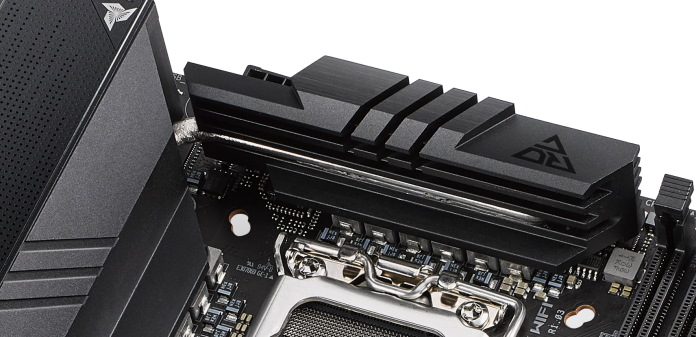
🧯 How to Prevent VRM Damage
| Action | Description |
|---|---|
| ✅ Add VRM Heatsinks | Use attachable VRM heatsinks to spread the heat the VRMs produce. |
| ✅ Use Undervolting | Reduce Core Voltages in BIOS if supported. This lowers the load on the VRM and decreases heat during benchmarks, gaming, etc. |
| ✅ Avoid OC on These Boards | Overclocking increases TDP (wattage, core voltage), which raises the load on the VRM and can overheat or kill the motherboard. |
| ✅ Use Low TDP Efficient CPUs | Lower TDP CPUs put less power load on the VRM. Opt for a Xeon E5-2620v3 instead of 125W+ processors. |
| ✅ Good Airflow | Ensure good airflow, especially directly over the VRM and its heatsinks, to actively cool the components down. |
| ✅ Thermal Pad Mod | Place a thermal pad on the back of the motherboard to transfer rear VRM heat directly to the case panel for extra passive cooling. |

🏁 Verdict: Are They Worth It?
Yes but if you know what you are doing, what product you will get and the risk you get...
For prices ranging from 120USD to 160USD, a Machinist X99 + Xeon E5 + DDR4 RAM combo can offer fantastic multicore and parallel process performance at the cost of power efficiency, expandability, and brand trust. It’s not for everyone but for the right builder and enthusiasts, if you research and find the best reliable one, it can be the hidden gem in the PC building and hardware world...
If you love taking risks (taking your 100-150 USD to risk), have nice building skills, have bios update and troubleshooting risks, know much about hardware, theese motherboard and combo's are purchasable for today. Also it will be very fun to you...
🛠️ Pro Tips When Buying
- Search for YouTube reviews or teardown videos of the exact model.
- Prefer sellers with high ratings (4.5 to 4.7+) and high level of sale (Thousands of unique sales) .
- If you plan to use NVMe SSD for your build, you need to make sure:
- Is the Motherboard support NVMe?
- If it supports, Is it PCIe x4, or just SATA M.2? SATA M.2 May limit your NVMe Drive's speed and latency...
- GPU Support, you need to check PCI version may match the GPU... Test system with a spare GPU you have before buying another GPU for your system that you build with theese bundle.
- You need to use a really good PSU. Theese systems may have bad voltage regulators, if you have a bad PSU, theese voltage regulators might kill system more...


Comments
Post a Comment